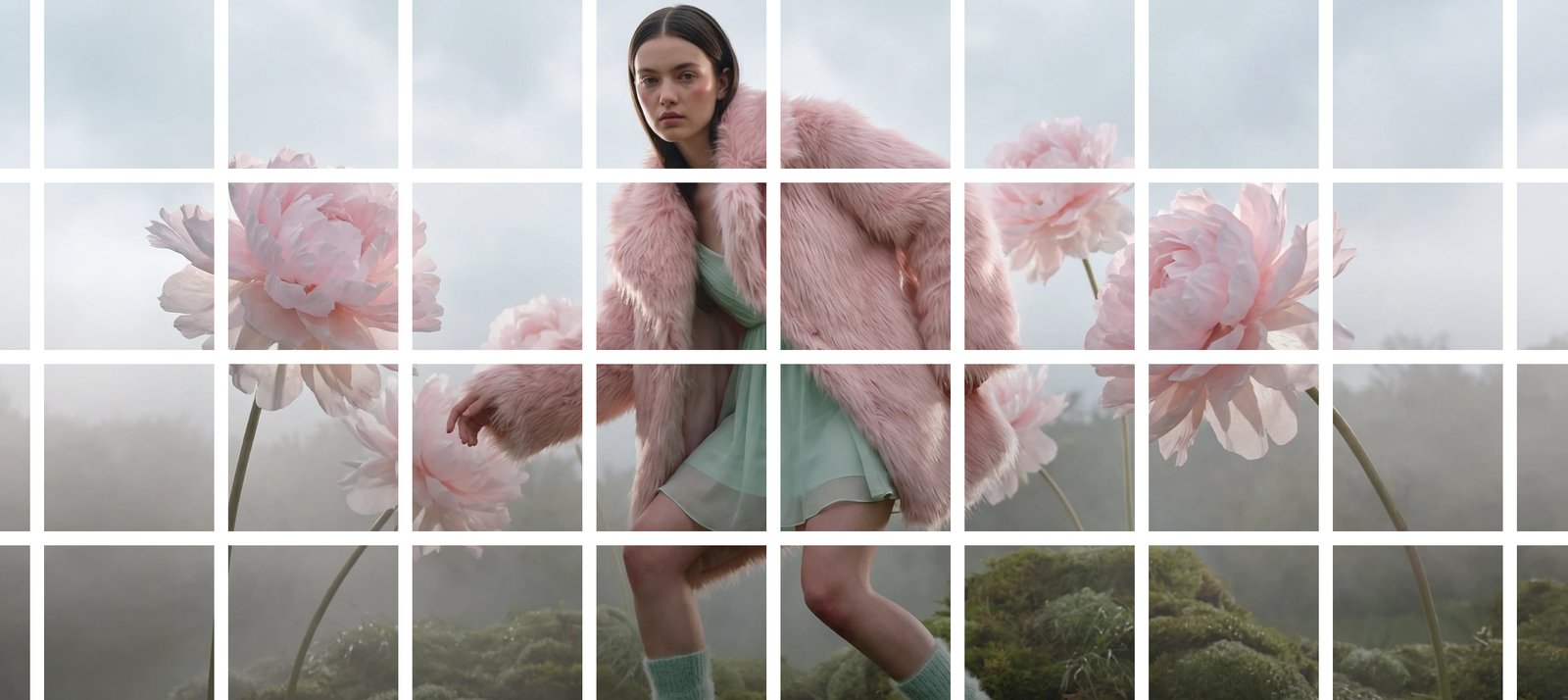
Look through any interesting Instagram profile, check out a designer’s portfolio website, or pass by a designer’s gorgeous tiled gallery wall, and you’re seeing the undramatic efforts of an image splitter. This is the secret of graphic designers, and now it’s something every creatively inclined person does: Split one awesome photo into perfectly proportioned sections and make something even better out of it than the original photo. The question isn’t whether or not to split images in 2026; it’s which tool to trust to do it. Online cutters are free tools that offer the same results. Still, they do it in varying ways, and sometimes very differently. AI-powered editors and online cutters both promise to deliver the same results. Still, they work in different ways and often in different ways, with different results. This guide explains the differences between them, where they excel, and which will save you time, quality, and frustration.
What Is an Image Splitter, and Why It Matters Now
An image splitter is a tool that divides a single photo into multiple smaller sections, usually a grid, a set of equal tiles, or custom-shaped segments, while preserving the visual continuity of the original image. Instead of manually measuring pixels in a design program, an image splitter automates the math, instantly generating pieces that line up seamlessly when displayed together.
The reason this matters more in 2026 than ever before comes down to how visual content is consumed. Feeds are denser, attention spans are shorter, and platforms reward content that feels intentional and cohesive. A split image isn’t just a technical trick anymore; it’s a storytelling device, a branding tool, and in many cases, a conversion driver for businesses trying to stand out in a crowded scroll.
Free Online Cutters vs. AI-Powered Editors: The Real Difference
At face value, both types of tools perform the same function: from an image, they generate a number of files. The mechanics below are, however, extremely different.
The free cutters online generally have fixed-grid maths. You select the number of rows and columns, the tool partitions the canvas mathematically, and you download this back. Simple, symmetrical layouts are OK, but this has no idea of what’s actually in the picture. The face might be divided in an unappealing manner. A focal point may be at the seam between two tiles, rather than centered in a tile. The tool doesn’t know, it doesn’t care.
This is where AI-powered editors come in handy, as they will understand the image itself. They can detect faces, the subject of the image, and the focal point with the content-aware detection method and adjust the split lines so that they do not cut through the crucial areas of the image. Many will also provide smart resizing, automatic aspect-ratio correction with respect to various platforms, and quality preservation that retains all the tiles in full resolution – which is often lost as a result of compression in free cutters.
The balance that used to be achieved between cost and complexity. That gap has been filled by 2026. The “free vs. AI” question is essentially a matter of value and worth to you; with modern AI-powered editors, they’re fast, intuitive, and accessible to any editor, not just those with training.
Think about what happens when you divide an image. You are left to your own devices on whether you align seams, match colors, or crop them so that they fit the platform’s dimensions. An AI-powered editor is there too: It can alert you to a split that would awkwardly divide a subject, suggest a better alternative grid, and even optimize each tile for the platform you’re publishing it to. This isn’t some kind of minor patch. It’s the difference between spending five minutes to finish up an asset that you have created and spending 20 minutes to correct one that a free tool got wrong.
Where Image Splitting Actually Gets Used
Instagram Grids and Carousels
This is the case that everyone imagines first and for a really good reason. When a photo grid maker is done well, a single panoramic or portrait photograph will be broken up into multiple posts to unfold as a visitor reads through a profile. Brands, photographers, and influencers use this to build an ‘art-directed’ feed that captures attention much longer than a single image, and a clean split is the difference between an art-directed feed and an accidentally chopped-up feed!
Tiled Printing and Home Decor
Splitting images is a very practical method, well before social media came into being, of printing large-format art on normal paper size. The same thinking is in effect with a flourishing DIY house decor movement today. People divide one picture into a grid of individually printed pieces, frame and display them as a poster-sized wall art, and get gallery-wall impact at gallery-wall price. It is entirely dependent on the tool you use whether those edges are able to fit together smoothly, or whether there are any mismatches visible at each seam.
Web Development and CSS Sprites
Technically, image splitting (for sprite sheets) and asset slicing (splitting into parts a site requires, or conversely, combining individual images into one for fewer server requests and faster page load) are used by developers. It’s a more strait-laced use case, but it’s one of the many fundamental aspects of web performance that pay off for a tool that maintains pixel-perfect precision all the way to the edge.
Bulk Processing Without Watermarks
But for agencies, ecommerce retailers, and content teams operating at scale, the focus changes again: no one wants to manipulate fifty product photos one by one, and no one wants to have a watermark on top of their client’s deliverables. The difference between a tool for serious workflows and one that’s just for personal use at odd moments lies with this: Batch processing and clean, unbranded exports.
What to Look for in an Image Splitter
Not all tools should be in your toolbox. Several things make a difference.
Resolution preservation is key; any split image is as good as its weakest tile, and compression artifacts are immediately noticeable side-by-side with the pieces. Whether you’re creating content for clients or your own brand, watermarks aren’t a big deal. Whether or not a tool scales with real workflows is what Batch and Bulk support is all about. More and more, it’s about smart, content-aware splitting, rather than about the mathematical methods of the 1990’s.
In addition to all those basics, the ability to be flexible with format is a silent key success factor in workflow. A program that only accepts one file type requires you to perform an additional conversion step before you can even use the image, an added hindrance each time. Seek out support for the formats you use, generous (or unlimited) free-tier usage that will not penalize you for cutting up more than a few images, and an interface that is easy to use, so that you are not learning a new tool each time you launch it. In 2026, the top image splitters don’t consider these extras, but essentials.
This is the principle behind Pyxa’s Visual Creation Toolkit, a category that’s defined by providing tools that are precise rather than one-size-fits-all for creators and businesses.
Why AI-Powered Editors Are Winning in 2026
Free-cutting was the solution to the simple maths problem of splitting an image. The AI age is answering the more challenging question: How to ensure that every cut shot is still on-brand, still purposeful, and still of high quality, automatically?
The reason is that tools such as Pyxa’s Advanced Image Editor now offer the flexibility to cut the image and then edit it, resize, and export the image to any platform it’s going to the next time. That’s not something a company would want to provide as a convenience. The difference between inspiring visuals that will foster trust and otherwise inspirational visuals that will subtly work against it.
Your Next Split Starts Here
The right image splitter doesn’t just divide a photo; it protects the quality, the intent, and the impact behind it. Whether you’re building a scroll-stopping Instagram grid, printing a gallery wall on a budget, or slicing assets for a faster website, the tool you choose is doing more work than it gets credit for. If you’re ready to stop fighting clunky grid math and start producing split images that actually look designed, step inside the world of leading AI-powered tools stack and see what AI-powered creation feels like.